
Fibonacci retracements is a technical analysis technique used to determine potential support and resistance levels. It is based on the Fibonacci sequence and on the idea that Fibonacci ratios will often act as supports or resistances during market retracements. Fibonacci retracements method can be applied to almost any market, including the stock, Forex and futures markets. To draw Fibonacci retracement lines: - Click on the "Fibonacci retracement" icon  - Click on an extreme point on a chart (Example: high) - Click on the second extreme point (Example: low) to complete the drawing process of the Fibonacci retracement lines. 0% line corresponds to the start of the retracement and the 100% line corresponds to the original start of the movement. For more information: https://en.wikipedia.org/wiki/Fibonacci_retracement Example: 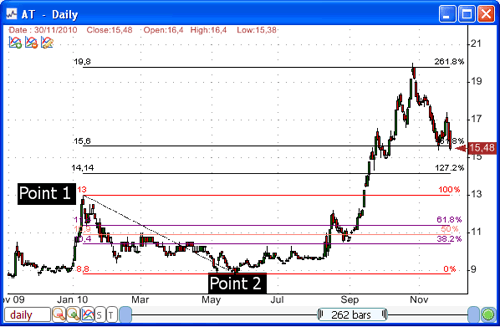 Auto-draw Fibonacci retracement lines: - Right click on one of the Fibonacci retracement lines, and then select "Settings" - Select "Layout" tab then click on "Auto Draw" This option instructs QuantShare to select automatically the highest high and lowest low based on trading bars between the positions of the first and second points of the Fibonacci drawing item. Note that the auto-draw feature is also available for the following drawing tools: Fibonacci extension, Fibonacci fan, Fibonacci arc, Gann square, Gann fan.
|

|
|
|
|




