Click here to Login


How to automatically start a downloader every few minutes?

Updated on 2011-03-01 04:10:04

Share |

To do this, you must create a global script.

- Select "Tools" then "Script Editor".
- Click "File" then "New"
- Type the script name then click on "OK".
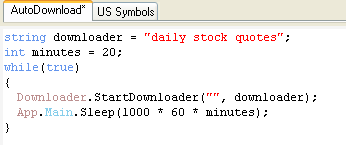
- Type the following script:

string downloader = "daily stock quotes";
int minutes = 20;
while(true)
{
Downloader.StartDownloader("", downloader);
App.Main.Sleep(1000 * 60 * minutes);
}

- Set the "downloader" variable to the item name and the "minutes" variable to the number of minutes to wait between requests.

Tips:

You can add the script to the bookmark panel so you can quickly start and stop it.
Selecting "Settings" in the menu, then click on "Add current script to bookmark panel".

Note that if your downloader is stored under a category, then you will have to change the line:

Downloader.StartDownloader("", downloader);

to:

Downloader.StartDownloader("category name", downloader);


no reviews (Log in)


Other how-to articles


How to plot support and resistance lines automatically


How to automate the data downloading process


How to automatically draw Fibonacci Retracement for each new stock?


How to automatically arrange charts?


How to debug a downloader


How to download earnings calendar data for various stocks


How to download Portfolio123 data into QuantShare


How to improve the performance of QuantShare databases?


How to download a trading item from the Sharing Server


QuantShare
Product
QuantShare
Features
Create an account
Affiliate Program
Support
Contact Us
Trading Forum
How-to Lessons
Manual
Company
About Us
Privacy
Terms of Use

Copyright © 2012 QuantShare.com
Social Media
Follow us on Facebook
Twitter Follow us on Twitter
Google+
Follow us on Google+
RSS Trading Items