Click here to Login

LiveZilla Live Help
LiveZilla Live Help


How to dynamically update the settings of an indicator

Updated on 2012-05-18 04:38:58

Share |

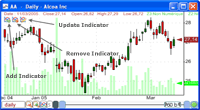
Let us start by adding an indicator. Here is how:
How to add a trading indicator to a chart

After adding the simple moving average (SMA) indicator, QuantShare will create a formula and add it to your chart's pane.

You can update the period of SMA by updating the formula directly:

- Right click on the chart's pane
- Select "Edit Formula"
- Use "Left/Right icons" to select the "Simple Moving Average" formula (A pane contains one or several formulas)
- Update the formula

Example:

a = sma(50); // Period set to 50 bars
plot(a, "sma", colorred, chartline, stylesymbolnone);


Alternatively, you can update the period dynamically by following the next steps:

- Click on the third icon at the top of the chart's pane
- Select "Simple Moving Average"
- Update the value next to "timePeriod" (Use the slider or type a value directly in the input box)

Notice how the moving average is automatically updated each time you change that "timePeriod" value.


Nb: To specify high values (above slider max), type the number directly in the input box then hit ENTER.


no reviews (Log in)


Other how-to articles


How to dynamically change the number of positions in a portfolio?


How to plot a time-series that do not update the chart scale


How to change volume bar colors when the price closes down


How to create a volatility-based Stop - Dynamic stop based on the Average True Range


How to plot the relative performance of several stocks/indices


How to add a trading indicator to a chart


How to optimize the stop limit of a trading system


How to create a custom trading indicator


How to plot the number of stock tweets per day


QuantShare
Product
QuantShare
Features
Create an account
Affiliate Program
Support
Contact Us
Trading Forum
How-to Lessons
Manual
Company
About Us
Privacy
Terms of Use

Copyright © 2012 QuantShare.com
Social Media
Follow us on Facebook
Twitter Follow us on Twitter
Google+
Follow us on Google+
RSS Trading Items