Click here to Login

LiveZilla Live Help
LiveZilla Live Help


How to download EOD quotes for active and valid stocks only

Updated on 2012-01-24 04:07:44

Share |

The aim is to speed up the downloading process by making requests to active and valid stocks only (valid symbols).

First, you should use your downloader to retrieve quotes for all stocks or securities in your database.

After the first download, you may notice that your downloader did not retrieve data for several stocks. In the next download, we would want to ignore these stocks.
You may also notice that there are no new data for some stocks. We also want to discard these inactive stocks in the next downloading process.


Steps:

- Select "Download" then "Download Manager"
- Select your end-of-day data downloader (Example: Historical Stock Market Data)
- Open the downloader by clicking on "Open Selected Downloader"
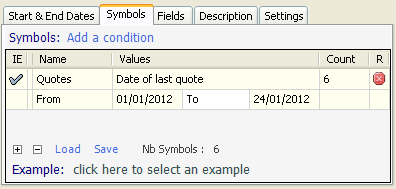
- Select "Symbols" tab, clear all conditions then add a new "Quotes" condition
- Under "Values" column, select "Date of last quote"
- Select a "From" and "To" dates. Example: 20/01/2012 and 24/01/2012
- Click on "Start Downloading" to get new quotes for stocks that already have data between the 20 and 24 January 2012.


This how-to article applies to EOD downloaders only.


one review (Log in)


Other how-to articles


How to download historical EOD data for penny stocks


How to quickly download the most recent EOD data for your stocks


How to download earnings calendar data for various stocks


How to download and use U.S. stocks earnings data


How to download new quotes when selecting a chart


How to screen for stocks having a high correlation with the Dow Jones index


How to download historical quotes of indices


How to get fundamental data for U.S. Stocks


How to get stocks for a particular index using the global script


QuantShare
Product
QuantShare
Features
Create an account
Affiliate Program
Support
Contact Us
Trading Forum
How-to Lessons
Manual
Company
About Us
Privacy
Terms of Use

Copyright © 2012 QuantShare.com
Social Media
Follow us on Facebook
Twitter Follow us on Twitter
Google+
Follow us on Google+
RSS Trading Items