Click here to Login


How to create trading rules based on Put and Call volume data

Updated on 2011-11-24 06:09:23

Share |

First, you must download put and call volume data for each U.S. stock. This data can be retrieved using the following downloader: Individual Stocks Put and Call Volume.

After the data is downloaded, select "Analysis" then "Screener".

To calculate the Put/Call ratio, type the following formula:
ratio1 = GetData("putcall_volume", "put_total", LastData) / GetData("putcall_volume", "call_total", LastData);

Here is a screen example:
ratio1 = GetData("putcall_volume", "put_total", LastData) / GetData("putcall_volume", "call_total", LastData);
filter = ratio1 > 2;


The above screen shows stocks whose Put/Call ratio is higher than 2.
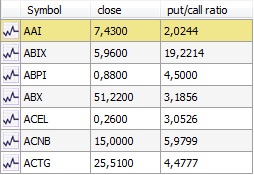


Here is how to plot this ratio on a chart:
How to plot put/call ratio of individual stocks


no reviews (Log in)


Other how-to articles


How to download and use U.S. stocks earnings data


How to create a trading system


How to create a volatility-based Stop - Dynamic stop based on the Average True Range


How to create volume bar charts


How to backup your databases (EOD, Intraday, Tick and Custom) and trading items


How to create a custom trading indicator


How to create and trade a Neural Network model


How to export trading data to a CSV file


How to hide stock data outside of regular trading hours


QuantShare
Product
QuantShare
Features
Create an account
Affiliate Program
Support
Contact Us
Trading Forum
How-to Lessons
Manual
Company
About Us
Privacy
Terms of Use

Copyright © 2012 QuantShare.com
Social Media
Follow us on Facebook
Twitter Follow us on Twitter
Google+
Follow us on Google+
RSS Trading Items