How to plot a time-series that do not update the chart scale
Updated on 2011-07-06 05:18:45
|
Each time you plot a time-series, the chart scale is updated automatically so that each time-series fit within the chart.
If you plot a line at 80 and the displayed stock prices vary between 25 and 35, you will end up with a chart that has a 25-80 scale range.
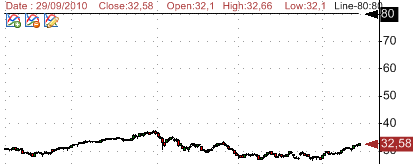
One way to fix this is by instructing QuantShare to ignore a specific time-series in the scale calculation. This can be done by adding a specific style in the "Plot" function last parameter.
The previous chart was displayed using the following formula:
PlotCandleStick("Quotes", colorBrown|255|colorViolet|255|0, StyleOwnScale);
Plot(80, "Line-80", colorBlack, chartLine, StyleSymbolNone);
By using the "StyleNoScale" setting, we instruct QuantShare to ignore the "Line-80" time-series in the scale calculation. The new formula is:
PlotCandleStick("Quotes", colorBrown|255|colorViolet|255|0, StyleOwnScale);
Plot(80, "Line-80", colorBlack, chartLine, StyleSymbolNone|StyleNoScale);
The "|" operator means that we want to apply both "StyleSymbolNone" and "StyleNoScale" styles.
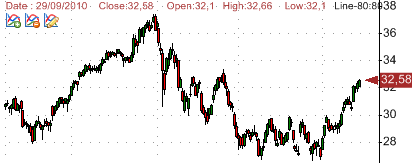
Line-80 is now hidden and it is displayed only when another non-hidden time-series (such as stock prices) reaches the level 80.
|