What is the Bookmark Panel?
Updated on 2011-03-14 06:05:24
|
The bookmark panel is a bar located below the top menu. The bookmark panel can hold trading item shortcuts, so you can quickly access them. It is similar to the bookmark panel you have in your browser (Where you can save your favorite WebPages).
There are two ways to add items to the bookmark panel:
- You can right click on that bar then select "Add Shortcut"
- You can drag and drop an item to that bar (Example: Click on chart, right click on it and then move your mouse to the bookmark panel)
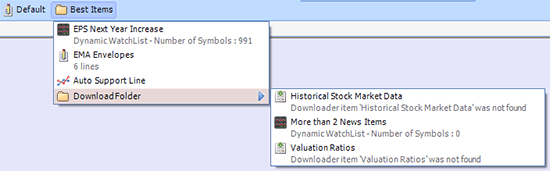
Inside this bookmark panel, you can store charts, scripts, downloaders, trading systems, ranking systems, watchlists, list of rules, custom drawing tools...
You can also create folders and store trading item shortcuts inside these folders. This can be accomplished simply by a drag and drop operation.
Note that it is also possible to add a folder inside another folder.
When you hover the mouse over an item, the description of the latter appears in a tooltip.
|